토론
댓글 · 메모 · 첨부
모든 작업은 토론(댓글), 날짜별 기록(진행 메모), 파일(인라인 이미지 + 첨부)을 담습니다. 이들은 작업 편집기 안에 있고, @-멘션한 사람에게 알림을 보내며, 다른 모든 사람과 실시간으로 동기화됩니다.
댓글 & @-멘션
작업을 열고 Comments 섹션에서 스레드 토론을 하세요 — 리치 텍스트, ⌘↵로 게시. @를 입력하면 팀원을 멘션합니다: 프로젝트 멤버(워크스페이스 멤버와 게스트 모두) 선택기가 뜨고, 칩은 이름을 보여주되 이메일은 보이는 텍스트에서 감춥니다. 에디터는 작성하고 뷰어는 읽습니다. 새 댓글은 작업 안의 모두에게 즉시 나타나고, 개수 배지도 실시간으로 갱신됩니다.
“누군가를 @-멘션했는데 그 사람 Slack으로 안 갔어요.”
@-멘션은 항상 인앱 알림(벨)을 만듭니다. Slack DM도 보냅니다 — 단, 그 사람이 자신의 Slack 계정을 연결한 경우에만. 워크스페이스를 Slack에 연결하는 것만으로는 부족하고, 팀원 각자가 자기 계정을 개별로 연결해야 합니다(워크스페이스 설정 → “Slack에서 DM 받기”). 그전까지는 인앱 알림은 받지만 DM은 못 받습니다.
진행 메모
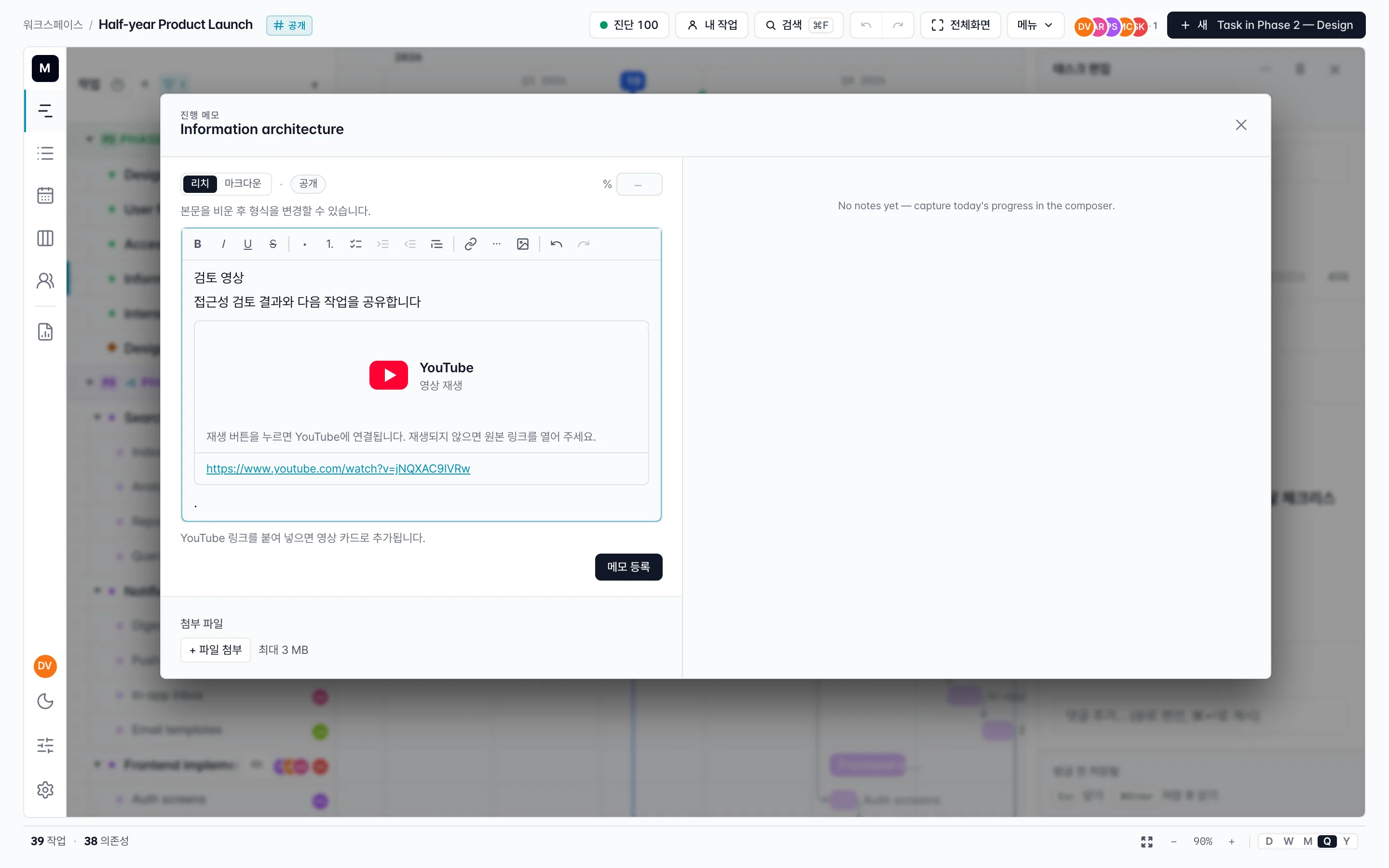
진행 노트의 리치 텍스트에 지원되는 YouTube URL을 붙여넣으면 영상 카드가 삽입됩니다. 마크다운에서는 URL을 한 줄에 단독으로 입력하세요. 읽는 사람이 재생을 눌러야 플레이어를 불러오며, 노트를 열 때 자동 재생하지 않습니다. 다른 미디어 URL은 일반 링크로 이용합니다. 이 삽입 기능은 진행 노트용이며 모든 리치 텍스트 필드에 적용되지는 않습니다.
진행 메모는 작업의 날짜별 기록입니다 — 댓글의 주고받음과는 별개. 상태 스냅샷에 쓰세요: 스탠드업마다 한 줄, 일정이 밀리면 메모 하나. 각 메모는 공개(모든 협업자에게 보임) 또는 비공개(나만), 리치 텍스트나 일반 마크다운으로 작성하며, @-멘션과 인라인 이미지를 담을 수 있습니다. 공개 메모의 멘션은 알림을 보내고, 비공개 메모는 보내지 않습니다(다른 사람이 읽을 수 없으니까요). 메모는 작업 편집기, 목록 보기의 Notes 열, 그리고 리포트에 나타납니다.
이미지 & 첨부
- 인라인 이미지 — 설명·댓글·메모에 끌어놓거나 붙여넣거나 골라 넣으세요. 큰 사진은 업로드 전에 브라우저에서 압축됩니다(최대 25 MB 입력을 ~3 MB 정도로 재인코딩), 그래서 휴대폰 사진도 그냥 됩니다. SVG·GIF·작은 파일은 그대로 통과합니다.
- 댓글의 파일 첨부 — 최대 10 MB, 허용 목록: 이미지, PDF, txt/csv/md, 최신 Office 파일(docx/xlsx/pptx), zip. 이미지가 아닌 파일은 다운로드 카드로 표시됩니다. (보안상 SVG·HTML 파일은 첨부가 차단됩니다.)
요약
- 댓글 — 작업 편집기의 스레드 토론; @로 멘션; 실시간 개수.
- @-멘션 도달 — 항상 인앱; Slack DM은 그 사람이 Slack을 연결한 경우에만.
- 진행 메모 — 날짜별 기록, 공개 또는 비공개, 댓글과 별개.
- 파일 — 인라인 이미지는 자동 압축; 댓글 첨부는 허용 목록에서 최대 10 MB.